
WordPress documentation you can actually play with, search that copes with your typoz, and WooCommerce doing less work on requests that don’t need it. Quite a few things to like in this edition!
There’s also got a proposal for storing API credentials in WordPress, plus some good examples of what happens when you rethink how you store and query your data. And yes, we’ll get into the performance side of that as well.
Anyway, lots to cover in the world of WordPress tools! Hope you enjoy it!
Hope you enjoy it!
🎓 From The Guild
My article on Modern WordPress Queries had an interesting question raised in the Within WordPress Guild. I decided to answer it in a public follow-up article, so those of you not yet part of it get a sense of The Guild. The question was:
Whether the improvements made for WordPress’s internal queries have now made the choice between custom fields and taxonomies an easier one.
My answer is published here: Custom Fields vs Taxonomies Queries
I’ve started recording my Cloudflare for WordPress course, and with that, I’ve made the prelaunch available:

🗞️ Within WordPress News
Here’s what I saw happening:
- The WordPress Code Reference now has code examples you can actually run. Change the code and see what happens, right there in your browser. Adam Zieliński explains how Playground powers the first two examples shipped with 7.1, with more planned for 7.2. Love seeing the docs become something you can learn from by doing!
- Ryan Welcher released Advanced Query Loop 5.0, with more clearly grouped controls and the option to combine sorting rules. Date first, then title, for instance. That works for queries that aren’t inherited from the template, and you’ll need WordPress 6.7 or newer. More query control without having to write it yourself.
Still one of my favorite Block Editor enhancing plugins. Should be in core, really.
- Remember Studio Code, which I talked about a little while back? Well, WordPress Studio has now rebuilt its desktop experience around it. Your sites, agent conversation, and live preview are together, and you can use annotations to point out what needs changing. It’s in beta, btw, and your existing local sites carry over when you enable it.
- A few welcome additions in Gutenberg 23.9. Insert blocks from the block toolbar, see which blocks have custom overrides in Global Styles (and filter to see those blocks together), and set horizontal and vertical gaps independently in Group layouts. All of this is in the Gutenberg plugin; don’t go looking for every bit of it in core just yet, ofc, but it’s coming soon enough.
- The SVG Icon API from 7.1 is getting more work lined up for it: replacing Dashicons in the admin bar and menu. The proposal covers accessibility and consistency alongside the visual changes. The icon mapping is still open for feedback. If a choice would help or confuse your users, now’s a good time to say so!
- Austin Ginder keeps going with Minn Admin. This time, version 0.37.0 adds a Design tab, bringing more editing into the alternative admin instead of bouncing you back to wp-admin. Good to see him filling in those gaps.
- One for those of you managing multiple WordPress sites over SSH: wp-cli-multi runs the same WP-CLI command across your sites, lets you control how many run at once, and reports failed commands. Handy when you want to know which sites still have a particular plugin installed. One small script, your list of sites, and the SSH access you already have.
This actually replaces quite a few things for my setup. If you’re not too afraid of the command line, dive into that one!
- An AI-generated site can look great on launch day. Who adds the next job opening or publishes the next article? Brad Williamslooks at AI-generated websites versus WordPress through the work a business needs to do afterward: publishing, revisions, integrations, and handing the site over.
He also makes room for static sites where the job suits one. A useful read if clients are asking what an agency brings after the first impressive demo.
- I linked to Troy back in August. Now Sybre Waaijer has put together a comparison of six ways to distribute WordPress plugins: Troy, Freemius, Easy Digital Downloads, Plugin Update Checker, FAIR, and Git Updater.
There’s quite a lot in here, from what gets installed on customer sites to who handles update requests and where licensing fits. Bear in mind that this is Troy’s own comparison. Use it to work out which questions to ask when choosing how to deliver your plugins.
- The next LoopConf is now June 16–17, 2027, still in Grand Rapids. I recommended the September edition in August, so do update your calendar if you were planning to go!
The lead sponsor pulled out six weeks before the event, removing half the operating budget. Organizers refunded tickets and covered non-refundable travel. The plan for 2027 is to fund the event through its attendees.
🚀 Performance & Security
- Ross Morsali shared how Search & Filter rebuilt its indexer, and this is a good one to understand. Compressed bitmaps represent sets of matching posts, so combining filters doesn’t involve shuffling huge arrays of IDs around anymore. On Search & Filter’s 40,000-post test site, he reports uncached queries going from 1.44 seconds to 50.7 milliseconds.
That’s quite the difference. Do read how he got there.
- Very much related to the Guild article above: BerlinDB 3.0.1 fixes query-result cache growth. Repeated invalidations could keep adding persistent entries for the same query. The fix replaces stale results under a stable key instead. If you’re using BerlinDB by John James Jacoby with a persistent object cache, this is one to check.
Mind you, existing orphaned entries still need your cache backend’s cleanup!
- WooCommerce 11.1 stops registering blocks on requests that won’t render any. This is the sort of performance improvement I love: stop doing work you don’t need to do. Woo measured Store API and REST requests getting 13–18 milliseconds faster, or 30–42% in its tests.
Plugin developers: if you do render Woo blocks in one of those contexts, check the new woocommerce_should_register_blocks filter. Product and variation descriptions already have on-demand handling.
- Eric Mann has proposed a Secrets API for WordPress 7.2: a shared way for plugins to store encrypted credentials and retrieve those credentials deliberately. The default storage would still be the options table, with the values encrypted. WP-CLI support and an admin interface are proposed for later.
This is still a proposal, so pay attention to the storage and recovery details as this develops. Especially with more sites connecting to paid APIs.
- Prefer to handle image conversion on your own server? WebberZone Image Optimizer converts existing media to WebP and AVIF while keeping the originals. It checks what the server can encode and serves the available formats through picture elements. AVIF still depends on your server’s image libraries, so check those.
- A page can load quickly and still be horrible to use. If the browser is busy chewing through JavaScript, your clicks and typing have to wait. Lee Sun-Hyoup has a very good walkthrough of the browser’s main thread with interactive demos for splitting up long tasks, batching updates, and moving suitable work to a Web Worker.
What I like here is that you can see the trade-offs. Giving the browser breathing room doesn’t necessarily finish the work sooner, but it can make the page respond sooner. Well worth spending some time with.
- Remember WP Beacon, which I shared back in May? Austin Ginder writes about his bot finding malware in a plugin’s development repository. According to his investigation, the infected code sat in SVN trunk, while WordPress.org kept serving the unchanged stable ZIP. So this wasn’t an infected update sent to all installed sites.
The risk was to anyone pulling that trunk code or running its Node build configuration. Austin reports the repository was cleaned and the listing reopened. Do read the write-up for the distinction between scanning released plugins and reviewing changes before release.
- David Pérez announced automatic security reviews for plugin releases. During the existing release cooldown, several AI models and Jetpack Scan check the changes. A high-risk score now blocks distribution through the WordPress.org update API automatically, and the plugin’s committers get an email with the findings.
That score can flag an accidentally introduced vulnerability as well as malware. If you maintain a plugin, do read how to respond to a blocked release or a false positive. Good to see the review process reaching beyond a plugin’s first submission.
- Before you connect an AI agent to your WordPress site, check what the connection actually allows. Creating a draft, installing a plugin, and running PHP are very different jobs. I’ve written about the permissions behind that MCP connection.
Start with the job you want done and the least powerful account that can do it. If you’re experimenting with broad access, use staging. “It supports MCP” doesn’t answer those permission questions.
- I’m sure you recognize this scenario: the build is finished, but that temporary administrator account is still there months later. Robert Abela shared a useful reminder about temporary access in Melapress Login Security. You can choose a role, set when access expires, and limit the number of logins. Expiry can also run from the first login.
Handy for giving a developer or support engineer access without adding another account you have to remember to clean up afterward.
My favorite Performance Optimization tools in WordPress:
- NitroPack: Cloud based performance optimizations
- Perfmatters: Clean up Scripts, and optimize WordPress
- WP Rocket: The best Front-end optimization plugin
- Code Profiler for WordPress
🔆 Within WordPress Highlight
WordPress search and typos are not a great combination. Per Søderlind has a solution for that: Loupe Search. It maintains a separate SQLite index with typo tolerance, phrase matching, and control over which post types and fields get searched.
You still use the familiar WordPress search entry point. The index does the work underneath, updates when your content changes, and has a WP-CLI reindex command for larger sites.
Do check the requirements before trying it: PHP 8.3+, WordPress 6.9+, SQLite 3.35+, and the relevant PHP extensions.
And, of course, there’s an Abilities API integration as well. So your agents can make use of it alongside your visitors. Pretty interesting addition to WordPress search!
Some of my favorite WordPress tools:
- My two favorite forms for WordPress: Gravity Forms and WS Form
- These are the themes I use: Ollie, Rockbase and GeneratePress
- And, obviously, Scanfully for all my Site Health & Performance monitoring
💡 Interesting Finds
- Your XML sitemap might look a little less pretty later this year. Joost de Valk explains why browsers are removing the XSLT view that turns the XML into a readable table. Chrome plans to switch it off in November, with temporary exceptions.
The sitemap itself keeps working for search engines. So, do keep yours enabled! This is about the view you see in your browser. Joost has also built a Chrome extension for anyone who wants to keep browsing sitemaps comfortably.
- My buddy Bjørn Johansen has three AI models review a change independently, then challenge each other’s findings. Do also read his follow-up with cheaper reviewers. Tiny test changes made the models look interchangeable; larger ones exposed the differences, along with mistakes in the benchmark itself. If you’re relying on AI reviews, there’s a lot to learn here.
- Before you download another enormous local LLM model, check out llmfit. It looks at your RAM, CPU, and GPU memory and estimates which models and quantizations suit your machine. Benchmarking options included. A useful way to narrow down what to try with the hardware you already have.
- Want more control over your SEO tools? OpenSEO is an open-source platform you can self-host, with keyword research, backlinks, rank tracking, and site audits. It uses DataForSEO underneath and has an MCP connection for your agents. Here’s the repository and setup.
- Keep, where I collect a lot of the links for this newsletter, now has a Mac app. Offline reading for the items you choose to keep on the device, the same library on the web, and Markdown notes alongside your sources. Very much my kind of tool.
- Cloudflare Images can now render text into images through its Workers binding. Text on its own or over another image, so think generated social images and labels. The binding also gets more ways to manage stored images, including signed URLs and direct upload links.
- Need to record a quick client walkthrough or bug report? Cap is an open-source Loom alternative for Mac and Windows. Keep recordings local, use S3-compatible storage, or self-host the platform. The docs cover the recording and hosting options.
- Tables can look perfectly clear and still be a pain to navigate with a screen reader. The WP Accessibility Knowledge Base has a practical guide to tables in WordPress. It walks through the Table block’s header setting and includes an audio example of navigating a table.
Do share this with anyone adding tables to your content. Hearing the column header alongside each value makes the reason for that setting much more obvious.
- We all use AI in various ways, but what if it’s all taking you just too long to ship code? Clare Liguori has published ten principles for working with coding agents, drawing on work across Amazon.
The practical bits are worth your time: give the agent a codebase it can understand, make tests fast enough to run repeatedly, and keep the same quality standards for the code you ship. There’s an upfront investment in getting that working. A useful read alongside Bjørn Johansen’s approach to code reviews above.
- Ever wanted your own handwriting as an actual font? Draw Your Font turns a photo of your letters into an installable one. The browser demo lets you try it without uploading the photo to a server.
A fun one after all that database and compatibility talk. Enjoy!
🛒 WooCommerce News
- Last time I covered the preview; WooCommerce 11.1 is now here. And with it, variation image galleries in core for every store. The old Additional Variation Images extension gets deactivated during the upgrade, and its existing data is migrated.
If you’ve built around the old metadata, do read the migration notes. That legacy value isn’t kept synchronized once core takes over.
- Two things to play with in 11.1’s experimental features: locally uploaded videos in product galleries, and shared editor asset bundles that reduce per-block scripts and styles. Both are disabled by default. And that asset change is for the editor; frontend assets are unchanged. Test both features with your gallery and editor extensions.
- Woo has documented its named constants for order statuses, product types, and other common values. Same string values, easier to read, fewer opportunities for typos. These classes arrived across several releases, so check your minimum supported WooCommerce version before using these classes. Oh, and mind
completedversuswc-completed. Different contexts!
- If your code hooks into product saves or ordering, take a look at Woo’s product lifecycle changes for 11.1 and 11.2. Fewer unnecessary writes help larger catalogs, but some callbacks run less often as a result. Using deprecated ordering hooks can also send a store back to the older, slower algorithm. Worth checking your integration so you actually keep those performance gains.
- Woo is proposing PHP 8.1 as the minimum for WooCommerce 11.5, currently targeted for January 2027. The requirement and the timing are still open for feedback. If you’re an agency or extension developer, check which stores or dependencies would hold you back, and let the team know while the decision is still open.
- Brian Coords shared that Woo is pilot testing an AI extension with a few merchants, following a preview at WordCamp US. Still a pilot, btw. His advice for store owners is to focus on making products discoverable; purchases through agents are still a small part of the picture in his account.
For more on preparing a store, watch From Crawlers to Customers by Danny Dudzic and Shani Banerjee. Product information, trust, and the practical work between an agent finding something and actually buying it.
🔎 Scanfully Updates
This has been months in the making, but I’m beyond excited to have our new Scanfully feature for WooCommerce close to beta release:
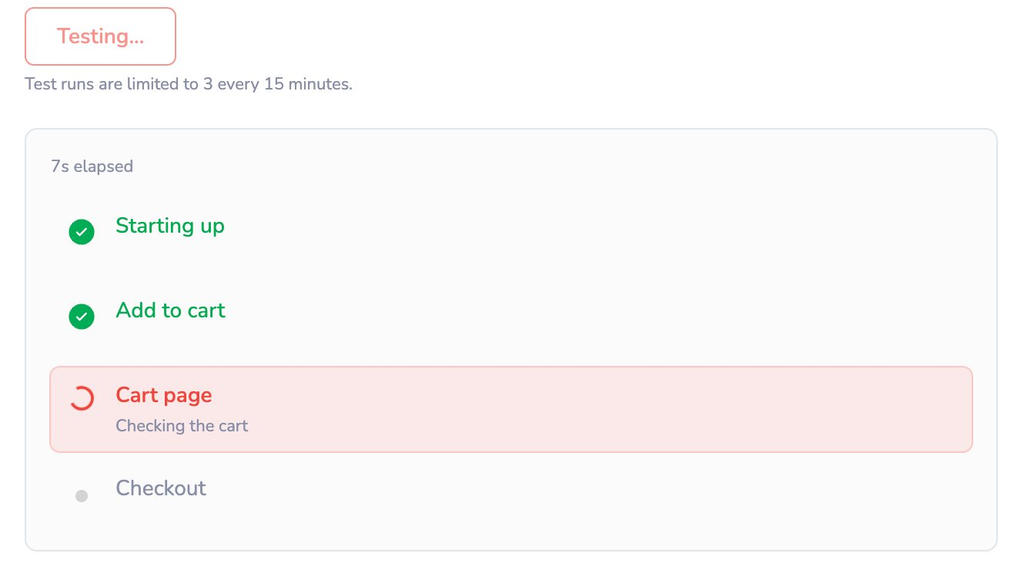
With this feature we’re finally moving Scanfully into critical flow monitoring. We’re starting with WooCommerce monitoring from product to checkout. Never miss any sales again and protect your revenue. Coming to your WooCommerce sites soon! We hope you’re as excited as we are!
🎁 Bonus
🎙️ The Within WordPress podcast is back! I sat down with Alex Moss from Yoast and we talked about diagnosing an old Mercedes with an LLM, turning kids’ drawings into coloring pages, and speed-building ad‑free PWAs with Claude. We wrap on authenticity, IRL experiences, jobs, and even AI, ASI, and faith—staying curious and optimistic. Great conversation, if I do say so myself.
That’s it for this week’s edition of Within WordPress. Thanks for reading!
Best, Remkus



Leave a Reply