
The week where on Wednesday we all sighed, “What a week.” Yup, that’s the week we have behind us. Raise your hand if you too were busy patching all the PHP things 🙋🏼♂️.
Even though most of the people in and outside of WordPress were busy with the above-mentioned, I did manage to find (and do) some interesting things for this week’s newsletter.
Let’s dive in; I hope you enjoy it!
🗞️ Within WordPress News
Here’s what I saw happening:
- WordPress 7.2 Beta 1 is ready to test, including responsive Gallery controls and browser-side image processing in the Media Library. Use a local or test environment, never production; the announcement includes Playground and bug-reporting links.
- Gutenberg 24.2 keeps notes open beside the canvas while you adjust block or post settings. The plugin also enables React 19 by default unless a known incompatibility is detected; test custom React code, with an opt-out under Gutenberg → Experiments if something breaks.
- If your plugin adds controls to the Post or Page tab, the DataForm testing guide explains how to check the experiment in Gutenberg 24.0+ on a test site. Compare the panels with the experiment on and off; the guide covers existing slots, filters, and role permissions.
- WordPress’s AI Team has approval to pursue MCP as part of the default WordPress experience. The meeting notes leave implementation and authentication open; WordPress 7.3 is a possible target, with no release commitment. YET.
I think it should be part of 7.2, but hey, what do I know ¯\_(ツ)_/¯
- Contributor Toolkit 2.0 Beta 1 puts PHP versions and debug flags in app settings, alongside a redesigned interface and seven included translations. This is a prerelease; PHP and debug changes apply at the next server start.
- Matt Cromwell walks through a local WordPress-to-static workflow: a design system compiles into a block theme, then Simply Static exports the site to Cloudflare Pages. WordPress stays local; newsletter signups use a separate API endpoint because the exported pages can’t run PHP forms.
I did a video on YouTube about this a while back as well, btw.
- Miriam Schwab traces WordPress’s head start with agents back to content ownership in a blog post on Elementor.com. The same open interfaces that keep your content portable also make it easier for agents to read and use. Permissions, drafts, and revisions provide controls for changes; Miriam argues the next step is for the ecosystem to expose more product functionality to agents.
- Brian Gardner previews Vert, an Ollie child theme with large type, full-width images, and styled block-editor patterns. The design is on display, with a launch waitlist rather than a download.
There’s something really nice about seeing Brian fully embrace Ollie for building a theme. I love that.
- If you’re using HelpScout, Daan van den Bergh’s WP Help Scout Docs 3.5 suggests matching documentation while visitors type a contact-form subject. Enable Form Integration and add
wp-help-scout-docs-searchto that field; your forms plugin must support custom CSS classes.
🚀 Performance & Security
- A little more on the PHP problems of this week:
- PHP’s October 23 advisory describes a separate, unpatched RCE vector, CVE-2026-115560. It requires upload progress enabled and
session.serialize_handlerconfigured asphp_binaryorphp_serialize, then switched tophpwithini_set()beforesession_start(). For that combination, setsession.upload_progress.enabled=0in server configuration, restart workers, and keep the setting until the next regular bugfix release. Applications that never switch the handler at runtime can keep upload progress enabled. - Daniele Berardinelli explains how PHP builds and deployment details complicate portable exploits.
- Mark Maunder from Wordfence calls for warnings grounded in practical exploitability, reporting attempts but no compromised sites observed by Wordfence on October 22. Those observations don’t establish that unpatched sites are safe.
- PHP’s October 23 advisory describes a separate, unpatched RCE vector, CVE-2026-115560. It requires upload progress enabled and
- Rank Math PRO 3.0.123 downloads from October 15, 20:02 UTC to October 16, 07:12 UTC contained malware. Treat sites that activated those files as compromised: follow the vendor’s recovery checklist, including credential rotation, before installing clean 3.0.124. The free WordPress.org plugin wasn’t affected.
- Patchstack traces backdoor installs to stolen UpdraftCentral Cloud keys. Check backup-only sites for those keys, too.
For the wider access review, my practical checklis blog post covers site owners, agencies, and vendors. And AI agents.
- WPZOOM has adopted WPBruiser and restored maintenance of the CAPTCHA-free anti-spam plugin after years without updates. Pavel Ciorici’s account explains the takeover and a token bug that rejected legitimate submissions; the free 3.4.0 release also adds login lockouts.
- Dan Knauss makes the case for extending Two Factor instead of writing another 2FA plugin: contribute security fixes upstream, then keep enforcement and onboarding in separate add-ons. The article separates shipped fixes from merged work and explains why the enrollment add-on needs explicit coverage rules.
- Cloudflare’s security-audit skill sends suspected findings to fresh verifier agents and keeps confirmed, unresolved and rejected results separate. It needs parallel subagents and Node.js; executing target code also requires an operating-system sandbox.
- Austin Ginder has folded breached-password checks into CaptainCore Helper, inspired by Passwords Evolved. The implementation uses role-based blocking on WordPress 6.8+, but allows logins if Have I Been Pwned is unavailable.
- Weston Ruter has committed the retirement of admin and login script/style concatenation to WordPress 7.2 development. Direct requests to
load-scripts.phporload-styles.phpreturn 410 Gone; the compatibility audit shows the affected plugin patterns and asset-loading alternatives.
- Powered Cache 4.0 recommends settings based on your site, including hosting, active plugins and existing cache layers; the defaults remain editable. The upgrade needs WordPress 6.5+/PHP 7.4+: update the free plugin before Premium, then save settings once for the new wildcard exclusions.
- Xaver released SnapShots 3.0.0. SnapShots saves the current state of a WordPress development site so you can restore it in one click. Each snapshot can include the database and the uploads folder.
Had somehow missed this plugin, but it’s a really sweet one! Probably saw a lot of use in this week 😓
🔆 Within WordPress Highlight
Andy Peatling’s October Building benchmark tested Claude Code and Codex on 21 owner requests. The agents completed 0 of 42 runs through MCP Adapter 0.7.0, versus 33 of 42 with REST access. His experimental abilities plan maps the missing operations, with monthly reruns planned to track progress.
💡 Interesting Finds
- Comp AI CRM is a self-hosted CRM built around an agent that researches contacts and schedules follow-ups. The README explains the evidence rules: strong evidence updates a record; weaker evidence stays a suggestion for human review.
- Andy Peatling argues that products should work inside the customer’s chosen agent, rather than make the customer switch dashboards and repeat context. The piece weighs what the product still supplies—its interface, expertise, and delivery—against AI cost and discoverability.
- Orca runs Claude Code, Codex, and other coding agents in separate Git worktrees, using your existing agent subscriptions. The diff-review guide shows how to attach comments to changed lines and send the feedback to an agent as one batch.
- AgentReady’s open specification covers answers in the initial HTML, accurate HTTP responses, and documentation links. Version 2.0 requires an MCP server or CLI only for products agents should act on.
- Corey Haines built Spare to replace a wall of process names with CPU and memory use grouped by app, project, and agent. The free, open-source Mac app runs on Apple Silicon with macOS 14+, and asks before closing anything.
- lauren (@poteto) puts agent corrections in an order: improve the codebase, enforce checks, then add written guidance and human review. The post includes a prompt for mining past review feedback; pstack supplies skills for investigating and verifying the resulting changes.
- @onlymoein’s Google Search Console MCP brings clicks, queries, and indexing data into your coding assistant, with checks for requests that Google might return empty. It runs locally; writes and full-access login are enabled by default, so choose
auth login --read-onlyfor analysis.
🛒 WooCommerce News
- If your client uses
/wp-json/woocommerce/mcp, WooCommerce 11.3’s migration guide explains the move from Woo REST keys to the WordPress MCP Adapter and an application password. Update the connection before upgrading; extensions using old ability names or filters need changes, too.
- Purple development has moved into WooCommerce’s monorepo, alongside the blocks the theme uses. Contributions now go to
themes/purple/; existing installations and independent theme releases are unaffected.
- Mateusz Zadorożny’s SHIFT64 Phone Validation checks and formats checkout phone numbers on the server in classic and block checkout; it does not verify ownership. Formatting is on by default, so test courier and SMS integrations first; WordPress 7.1+, PHP 8.3+ and WooCommerce 7.2+ are required.
- Extension developers can test WooCommerce 11.3’s experimental extensible abilities, which add custom fields to existing MCP abilities. The API is off by default and not for production; the gift-wrap example covers a field, filter, and validator.
🔎 Scanfully Updates
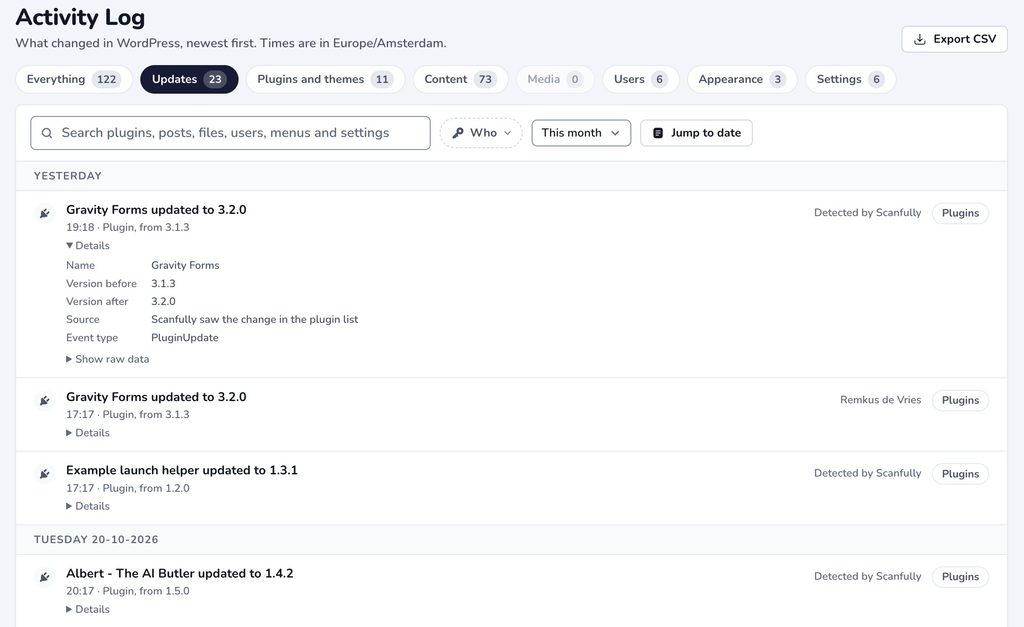
- We’ve rebuilt the activity log in Scanfully 2.3, making it easier to see who changed what on your WordPress sites. The Who filter lets you follow a person’s changes across content, settings, and updates. Update the Scanfully plugin to 1.9.0 or newer to capture the new events.
- We’ve opened the WooCommerce Monitoring beta! Scanfully tests your store’s configured purchase flow up to the payment step, without taking payment, and captures a screenshot when a run fails. It’s free during the beta; contact me to get access.
🎁 Bonus
Keep WordPress updated. Use reputable plugins. Download them from official sources. That’s familiar advice, and there are good reasons for it. But what happens when the official plugin package contains malware? Or when an attacker can send commands using a remote-management key your site already trusts? More on that in my blog post: When Trusted WordPress Tools Become the Way In.
That’s it for this week’s edition of Within WordPress. Thanks for reading!
Best, Remkus



Leave a Reply